Home Row
Free 12 wpmWhere your fingers rest. Every other key is a reach from here and back.
- fj
- dk
- sl
- a;
- gh
- Home Row review
A touch typing course
62 lessons that start on the home row and add two keys at a time. The next key lights up, the finger that presses it lights up, and the lesson is scored until you can hit it without looking down.
12 units 62 lessons 3 keyboard layouts 6 free, no card
Every key is colored by the finger that presses it, here and in every lesson. The keyboard on screen is the one you are learning, so your eyes never go down to your hands.
Nothing is introduced alone. Each lesson teaches two keys, then mixes them into everything you already have, so by the last unit every key has been typed against every other one.
Where your fingers rest. Every other key is a reach from here and back.
The reach up. Index fingers stretch inward, the rest go straight up.
The reach down. Slightly harder, so the drills are a little longer.
Shift with the opposite hand, and the whole alphabet in capitals.
Quotes, question marks, dashes and brackets: everything a sentence needs.
The number row, taught from the middle out so each hand learns its side.
Shifted numbers and the symbols code and email are made of.
Every key is known. Now the goal is rhythm: common words, common pairs, real sentences.
Full paragraphs at speed, and a capstone that proves it.
Email addresses, street addresses and appointment details, copied accurately.
Measurements, prices and scores: numbers that have to be right.
The remaining brackets and symbols, then small code snippets and terminal commands.
Where your fingers rest. Every other key is a reach from here and back.
The reach up. Index fingers stretch inward, the rest go straight up.
The reach down. Slightly harder, so the drills are a little longer.
Shift with the opposite hand, and the whole alphabet in capitals.
Quotes, question marks, dashes and brackets: everything a sentence needs.
The number row, taught from the middle out so each hand learns its side.
Shifted numbers and the symbols code and email are made of.
Every key is known. Now the goal is rhythm: common words, common pairs, real sentences.
Full paragraphs at speed, and a capstone that proves it.
Email addresses, street addresses and appointment details, copied accurately.
Measurements, prices and scores: numbers that have to be right.
The remaining brackets and symbols, then small code snippets and terminal commands.
Where your fingers rest. Every other key is a reach from here and back.
The reach up. Index fingers stretch inward, the rest go straight up.
The reach down. Slightly harder, so the drills are a little longer.
Shift with the opposite hand, and the whole alphabet in capitals.
Quotes, question marks, dashes and brackets: everything a sentence needs.
The number row, taught from the middle out so each hand learns its side.
Shifted numbers and the symbols code and email are made of.
Every key is known. Now the goal is rhythm: common words, common pairs, real sentences.
Full paragraphs at speed, and a capstone that proves it.
Email addresses, street addresses and appointment details, copied accurately.
Measurements, prices and scores: numbers that have to be right.
The remaining brackets and symbols, then small code snippets and terminal commands.
This is the real first lesson, F J: seven exercises, in this order, with the words the course itself uses. Every lesson that teaches keys has the same seven.
Rest on the home row. f (left index) and j (right index). Look at the keyboard below, not your hands.
Short bursts of the new keys. Return to home position after each reach.
The new keys mixed into everything so far.
Real words spelled with the keys you know.
Longer groups. Aim for an even beat rather than speed.
A second pass at words, a little longer.
Everything from this lesson. This one is scored for stars.
A drill counts once you are 90% accurate on it. The lesson check counts once it passes. When all seven count, the lesson is done and the next one is waiting.
The whole scoring system is built on that sentence. Accuracy earns the first two stars on its own. Speed cannot earn any until accuracy has, so hitting the right key is always the fastest way through.
| Stars | Accuracy | Speed |
|---|---|---|
| ★☆☆☆☆ | 90% | Not counted yet |
| ★★☆☆☆ | 96% | Not counted yet Passes |
| ★★★☆☆ | 96% | Three quarters of the lesson's target |
| ★★★★☆ | 97% | The target itself |
| ★★★★★ | 98% | A quarter past the target |
The target climbs from 12 words per minute to 40 by Mastery, then eases off for the practical units after it, where numbers and symbols slow every hand down.
Units, left to right. A number is the words per minute that unit's lessons are scored against.
The course is the spine. These are the things around it that keep people coming back to it.
Every keystroke is timed and scored on its own. Drills lean on the keys you miss, and a practice mode goes at them directly.
One, two, three and five minute tests, scored the standard way. A run at 90% accuracy or better earns a certificate you can print.
Speed over time, minutes a day against your goal, a per-key heat map of accuracy, streaks and badges.
Word Rain and Sprint, for the days a lesson feels like homework.
Up to six profiles on one account, each with its own progress, layout and settings, and one subscription covers them all.
A whole course for each, built outward from its own home row. Not a QWERTY course with the letters moved.
Paste a chapter, a speech, the vocabulary of your job, and practice on that instead.
A laptop, a desktop, or an iPad with a keyboard attached. It runs in the browser and in the Home Row Hero app for Mac, iPad and iPhone.
A native app for Mac, iPad and iPhone, with the whole course inside it. Every lesson runs with no network, and what you type offline counts the moment you are back on one.
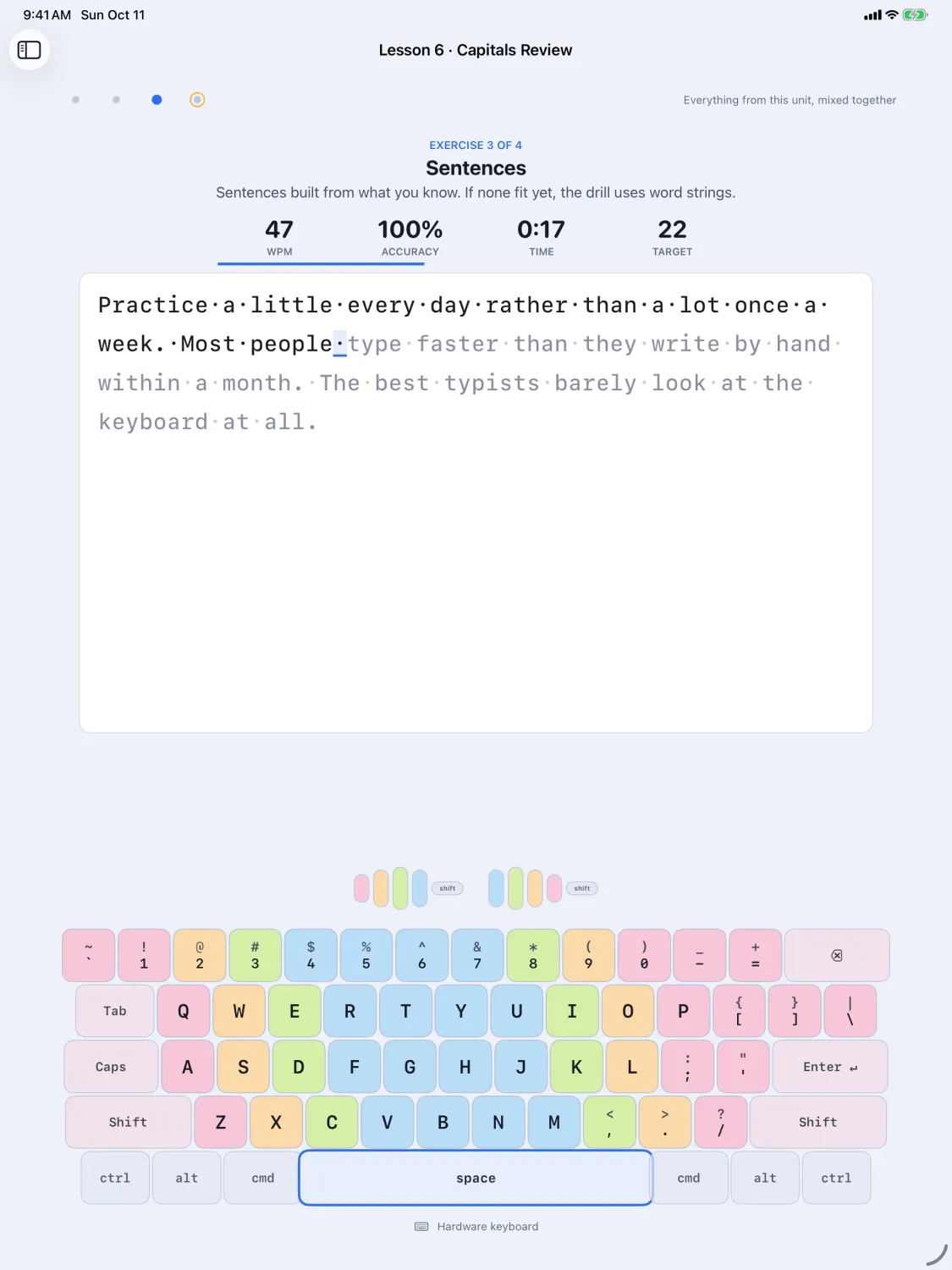
The Home Row unit is free, 6 lessons, no card. The rest of the course is a subscription that starts with 3 days free.